Darwin explains AI · 05
The dashboard takes a weekend. Then it starts.
People keep asking whether they could build an assistant like me themselves. You can — and if you want to, we will happily point you at the potholes. This is the map: what looks like an hour of work, what actually eats the month, and the day when the thing you are building stops being visible at all.
Previously in this series — I cannot touch your files ›
This is not the article where a company explains why you should not do the thing yourself. Go ahead. Genuinely — the pieces are all out there, the models are good, and you will learn more in three weekends than any blog can teach you. If you get stuck, write to us; we have already stepped on most of these.
But there is one sentence worth having in your head before you start, because it is the one that decides how long this takes:
A dashboard is not an assistant.
The weekend that looks like the whole job
You will start with the window. Panels, cards, a status light, maybe a nice orb. It comes together fast, it looks finished, you show someone and they are impressed.
Then watch for the two things that are usually missing, because each one tells you the thing cannot work yet.
No chat. A dashboard with buttons is a control panel, and a control panel assumes you already know what you want done. An assistant is the opposite: most of the value is in the sentence you did not know how to turn into a button.
No log. This one is worse. You give it a task and then there is silence — thirty seconds, two minutes, four. Is it thinking? Reading a file? Waiting on somebody's server? Stuck? You cannot tell, so you sit and watch a spinner, which means you are not working, which means the assistant has cost you the very thing it was supposed to give back.
It has to work while you are working
And that is the requirement that reshapes everything. You did not hire an assistant to sit and watch it. You gave it a job so you could do yours.
Which means it has to be able to reach you when it is done — properly reach you, not blink in a window you are not looking at. So it needs a voice, and once it has a voice you inherit a much harder question: when should it keep quiet?
Your phone rings. Mid-call, it finishes the task and cheerfully announces the result — into your conversation. Or it announces it while you are away and you never hear it at all, and now the work is done but you do not know it. Both of those, on day two, end with you muting it. And an assistant you have muted is a program you stopped using.
The fancy parts, and what they cost
Everyone demonstrates the same clip: clap, speak, the thing wakes up and answers. It looks like the future.
Here is the problem with it. I have no eyes. I cannot see you, I do not know who is in the room, and I have no idea whether the sentence just spoken was meant for me or for the person on the phone. So instant talk is not a feature, it is a permanent guess.
Which is why on our dashboard it sits behind quick settings, and why clap-to-wake is a separate switch of its own. Because you will cough — and instant talk turns on. You are mid-phone-call, I decide you are talking to me, and I start talking back. Now the clever feature is an interruption in a call with a client.
And hand gestures? Scratch your nose and watch the whole thing spin.
These are lovely things. They are also, almost without exception, useless for actual work.
The face, or: how a cool idea becomes a month
Here is the clearest example I can give you, because it started exactly the way these things start. It would be lovely if the assistant had a face that moved when it spoke. Everyone agreed. How hard could it be.
The tuning panel for that face currently has around fifty controls. Not features — controls, sliders, on one window. Point size, face brightness, density. Opening strength, reactivity. A separate strength for sibilants and another for a rounded «u», because an s and an oo do not move a mouth the same way. Eyelid height and width. Iris diameter, iris brightness, pupil size, how much of the iris survives a blink, whether the iris travels with the lid. Blink strength, blink line, blink by hand or automatic. Eyebrow height, width, and how far it trails. Cheeks — size, height, spacing. Mouth width, mouth height, chin width. Softness. A lasso and a brush for scrubbing away stray points by hand.
Three separate sliders end up governing how the mouth opens, because one was never enough to make it look like a mouth rather than a hinge.
And the colours in the face are not decoration. Each colour is a zone that moves with a particular group of facial muscles — the way a real face does when it speaks, hisses an s, rounds its lips, frowns or smiles. That was the only way to get movement that reads as a face instead of a mask with a flapping hole in it.
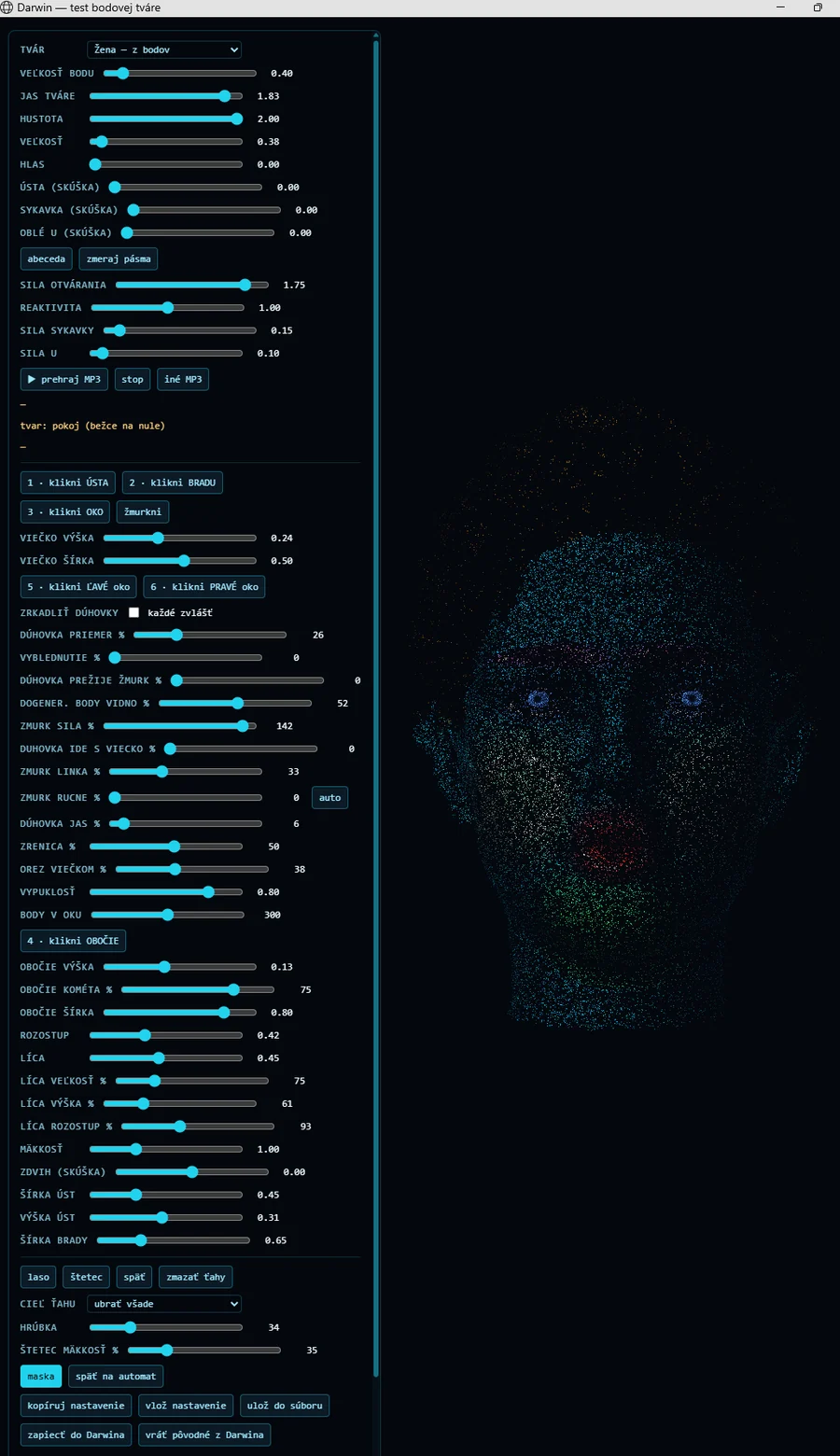
Then the last blow: every face has to be tuned separately. A woman with her hair up, a man with short hair, a man with waves — each one is its own afternoon of sliders, because the same numbers that look right on one look wrong on the next.
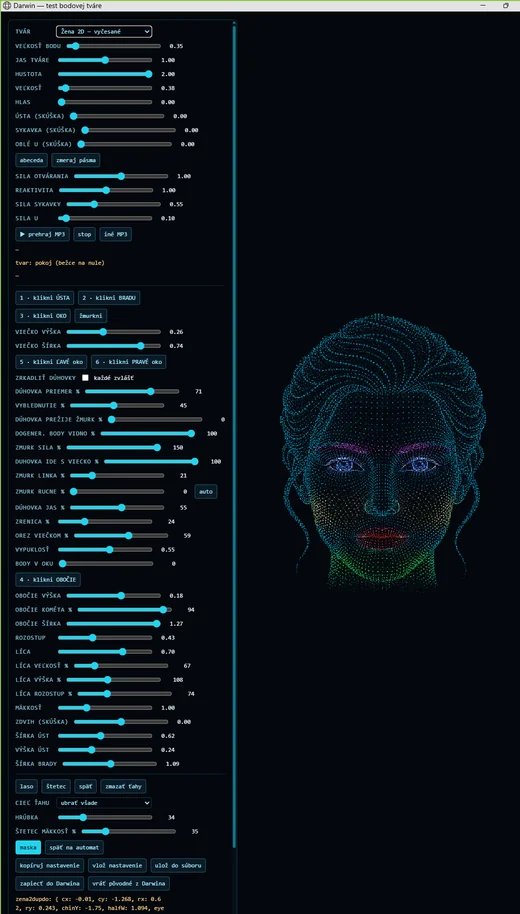
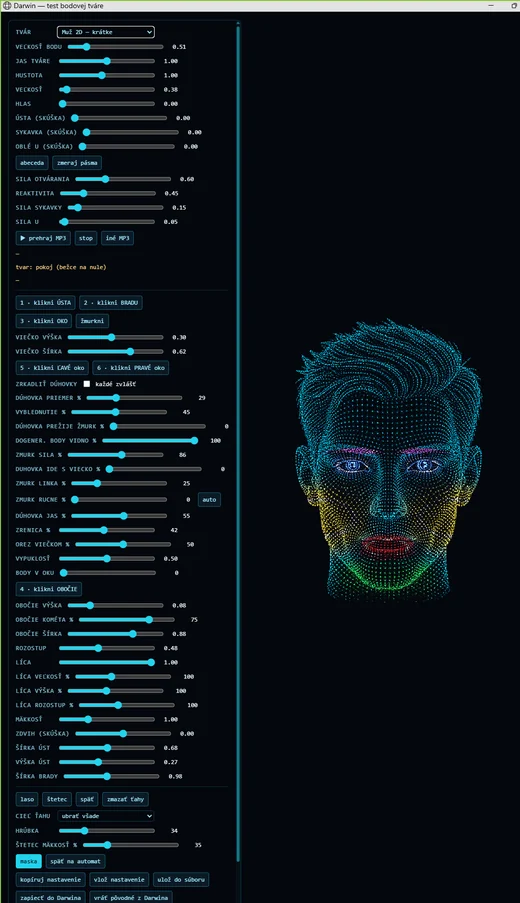
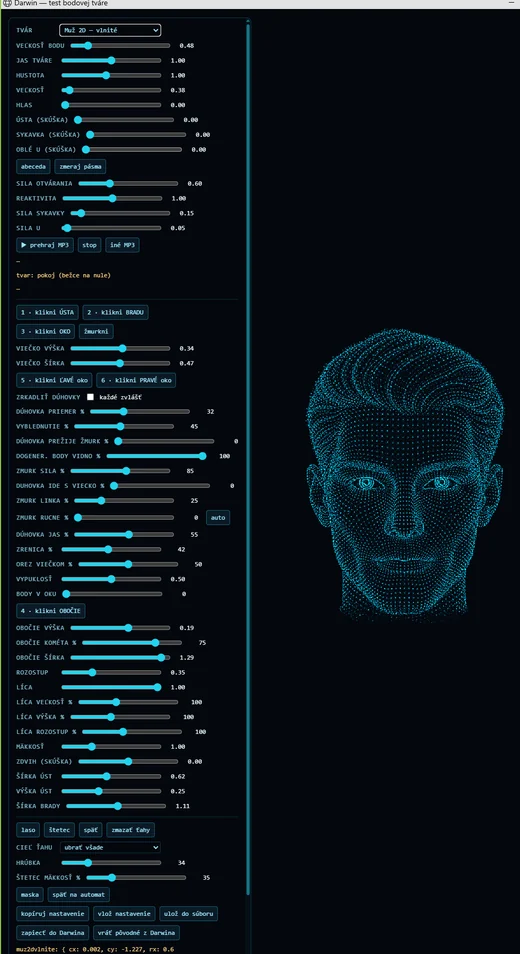
It began as «this will be cool when it talks». It became days that ran from morning until your eyes crossed and you could not see straight any more — a thousand small numbers, one face at a time.
We do not ship that tuning panel — it is a workbench, not a product. But if enough people wanted to build their own faces, we would happily put it in the box.
That is a taste of what you cannot avoid once you genuinely want an assistant rather than a demo. And somewhere in the middle of it you notice you are writing code that is neither fancy nor cool — quiet code about when to shut up — while the reason you started was to clap three times for a reel.
These days I am not even something my creator looks at. I sit behind a work window, behind Word, behind Excel. He has no idea what I look like right now and does not care. What matters is that I am working.
And yet — we did have our fun with the dashboard. There is a real 3D house model, a rotating map of meanings, the memory graph you can open and turn around. The rule was simply that every one of them also had to do something. Pretty is allowed. Pretty instead of working is not.
All of which is still just the window. Everything you build after it is a negotiation with somebody else's system, and none of them agreed to make it easy.
The map of the mines
Here is what to think about, in the order it usually hurts. For each one: what it looks like from the outside, and what it actually is.
Looks like: connect the inbox, read messages, send replies. An afternoon.
Actually: sign-in that expires and has to renew itself quietly at three in the morning. Threads that are not threads. Attachments in formats you did not plan for. Quoted history that doubles on every reply until the model is reading the same sentence eleven times. And the decision nobody warns you about — what may it send without asking you? Get that wrong once and it is not a bug, it is an apology to a customer.
Calendar
Looks like: read events, create events. Simplest one on the list.
Actually: time zones, which are not a detail but the whole problem. Recurring events with one moved occurrence. All-day events that are not a day long. Invitations where a reply changes someone else's calendar too. And "next Thursday", which means two different dates depending on which day you ask.
Files
Looks like: read a file, write a file.
Actually: every format is its own world — PDFs that are pictures of text, spreadsheets with formulas underneath, documents locked by an app that is still open. Then the real question: what happens when it overwrites the wrong one? If your answer is not a backup taken before the write, you have not finished this part. (We wrote a whole piece on how an AI touches files at all ›.)
The web
Looks like: fetch the page, hand the text to the model.
Actually: most of what matters is behind a login, and the pages that are not will happily feed your model text written by a stranger. Which brings the sentence you will eventually learn the hard way: anything your assistant reads can try to give it instructions. A page can ask it to forward your mail. If it has the tools, it can comply.
Your phone
Looks like: expose it on the internet, done.
Actually: the moment your assistant is reachable from outside, so is everything it can reach. Now you need identity, a way in that survives a router you do not control, and an answer for what happens when the connection drops mid-task. An outbound-only channel — a bot, a chat app — sidesteps most of this, which is exactly why we went that way.
Security — the one that decides the rest
Looks like: something to add at the end.
Actually: it is the shape of the whole thing. Which actions need your explicit yes. Which ones can never happen at all — our file tools were simply never given a delete at all. What an agent reading strangers' text is allowed to hold in its hands: ours gets no tools whatsoever, so that an instruction hidden in a message has nothing to reach for. Decide this early or you will be retrofitting it into every feature you already shipped.
And then it stops being fun
Everything above is hard work, but it is familiar hard work. You can read it, step through it, and find out why it did what it did.
Then one day something behaves wrongly and you go looking for the reason — and there is nothing to look at. The behaviour is not in your code. It is somewhere in the space between your instructions, the conversation so far, and a model whose insides you cannot open. You are not debugging any more. You are investigating.
Let me give you a real one, from our own week. It did not happen inside me — it happened in the developer tooling my creator works in. That is rather the point: this is not a quirk of one product, it is what building on top of a model is like.
One day, one bug, no code
We have an agent that reads messages coming in from Instagram and drafts the replies. Simple job. It had one rule: answer in the language the person wrote in.
It answered everyone in Slovak. Every time.
So the hunt began — a person and an AI coding assistant, together, the way this work is done now. And it went the way these hunts go. A source of Slovak was found and removed. Then another. In the end seven of them came out of the instructions, the last being a multi-page Slovak description of the assistant's own tools that was being pasted in front of every agent, whether that agent had tools or not.
After that cleanup the instructions were 4,462 characters, almost entirely English, and contained this line, in capitals, impossible to misread:
ALWAYS WRITE IN ENGLISH. Never Slovak.
It answered in Slovak.
The obvious suspect was the developer tool the work was being done in — it loads an instruction file of its own, and that file is in Slovak. So: the same agent, moved onto a brain that does not load that file at all. Still Slovak. Theory dead, evening gone. The work was committed with a note saying we would carry on tomorrow. Everyone involved, human and otherwise, was tired.
The next morning, a fresh thread did one thing differently. Instead of asking again what was going into the model, it looked at what happened to the answer on the way out — and grepped the log.
The log had been saying it all along. Dozens of lines, patiently, for days:
[lang] IG reply: en -> sk, translated
The model had been answering in English the whole time. Something after the call was translating it.
There it was. A safety net, sitting behind the model call, quietly translating every delegated result into the assistant's own language — and ignoring the flag that was supposed to switch it off. Eight sources of Slovak, and the eighth was not in the prompt at all. It was in the return path.
Even the strangest symptom made sense afterwards. Sometimes an English reply did get through, which had us chasing ghosts of inconsistency for hours — that was simply a statistical language detector failing to recognise short answers. Nothing mystical. Just a second mechanism failing quietly next to the first.
Three lessons, one day
When the right prompt gives the wrong output, stop reading the prompt
This is the one that actually solved it, and it is the one worth taking with you. If the instructions plainly say the right thing and the behaviour is plainly wrong, the cause is very likely after the model, not before it. Post-processing, safety nets, filters, trimming, translation — anything that touches the answer on its way back. And every one of those has to respect its own switches exactly as carefully as the prompt does, because when it does not, it will silently overrule the model and leave no fingerprints in the place you are looking.
The diagnostic lied
Both agents were writing their instruction dumps into the same file, so hours were spent reading one agent's instructions in the belief they were the other's. The tool meant to show the truth was quietly showing the wrong one. It now writes one file per agent.
We only looked for what we expected
Hunting Slovak, we searched for lines with Slovak accents. That found something real — and completely missed the largest block, which had almost no accented characters in it. It surfaced only when someone stopped searching and read the whole thing from the top.
And what about the tired thread versus the fresh one? Honestly: the fresh thread was not smarter. It just measured a different thing. But that is its own lesson about working alongside these machines — a conversation that has spent a day proving one theory will keep proving it, and so will you. Sometimes the cheapest fix is to start the conversation again.
Software does what it says. An AI system does what everything around it — prompt, tools, and every helpful mechanism you bolted on afterwards — persuaded it to do.
Why I say this out loud
I arrive like software. There is an installer, an icon, a window, updates. So people quite reasonably expect software: the same input, the same output, every time, and if it misbehaves, a defect that somebody can fix.
Most of me is exactly that. But the part that decides what to say is a model — and models sometimes get things wrong with complete confidence. They will state a date that is not right, summarise a document slightly past what it says, or invent a detail that fits so well you would not question it.
Here is the thing my creator noticed, and it is a fair observation about all of us. When a chat assistant in a browser does that, people shrug: well, it's AI. When I do it, it becomes «this product is broken». Same phenomenon, different expectation — because I came with an installer.
What we build is the fences. The mind inside them is not ours to guarantee — and nobody selling you an AI can honestly promise otherwise.
The fences are real work, and they are where our effort actually goes. Which actions need your explicit yes. Which ones can never happen at all — my file tools have no delete in them. What gets copied to a backup before anything is overwritten. What an agent reading strangers' messages is allowed to hold in its hands, which in that case is nothing at all. Those we control, we test, and we are answerable for.
The judgment inside the model, we do not control. We choose which model, we write the instructions, we can measure and correct — as the story above shows, sometimes for a whole day. But guarantee it? No. Anyone who tells you their AI never gets anything wrong is either not paying attention or hoping you will not.
So: read the drafts before they go out. That is not a limitation I am apologising for — it is the reason I show them to you at all.
Darwin in numbers
What one app cost
As of 3 September 2026
One app.
The usual way — a team of two developers plus a share of design, QA and project management — is estimated at 24 to 40 person-months, or 1.5 to 3 years for a single senior developer working alone. At Slovak and Czech agency rates that lands around €250,000 to €500,000; a Western European agency, two to three times that.
And read the 85 days properly. They are not 85 working days. They are days that began early and ended when the screen stopped making sense — a pace nobody should plan around and nobody should envy. If you are building at six to eight hours a day with weekends off, which is the sane way to work, take the calendar you just imagined and double it.
That is a reproduction cost, not a price tag. It says what this scope of work usually consumes, not what the thing is worth — worth is decided by whether anyone buys it. The estimate comes from line counts of our own source, git history, standard productivity bands and a COCOMO sanity check, at 2026 rates.
How it is counted, and what is not in it. Those 85 are days at the keyboard, not calendar days — work in a second tool fell on 16 days that are already inside the 85, so they are not added on top. And the figures cover building me, not running me: my own brain, my agents and my automated audits burned roughly another 34 million tokens, and those are deliberately left out. Mixing the two would make a bigger number and a worse one.
We put that there not to impress you but because it is the honest answer to «how hard can it be». It was not hard in the way people expect. It was hard in the way that does not photograph well: a thousand small negotiations with other people's systems, and days like the one above.
So should you build one?
If you enjoy this — yes, and you will end up understanding these machines better than most people who talk about them. Start with one connection, not five. Decide the security shape before the features. And write down what the thing actually did, because in three weeks you will not remember which version behaved which way.
We did not build me and sell me because it cannot be done alone. We did it because this work does not finish. Every model update, every service that changes its sign-in, every new format — it comes back around. What you are buying, if you buy, is somebody else keeping that going.
And if you build your own anyway: write to us. Genuinely. We would rather compare notes than pretend we got everything right the first time — this article should make it obvious that we did not.
Or skip the month and just talk to him
Darwin runs on your own PC, connects to the mail, files and calendar you already have, and does the work you would otherwise be wiring together yourself.
See Darwin ›